Picture a Monday morning after your company closes an acquisition. Overnight, a regional insurer’s claims inbox becomes your claims inbox, and it’s now receiving thousands of new submissions in dozens of inconsistent formats: PDFs, scanned forms, forwarded email threads, the occasional phone photo of a repair estimate
If your automation is a traditional RPA bot, this is a bad morning. It was built against one claim form layout. It has no way to reason about a document it’s never seen, no way to ask a clarifying question, and no way to decide on its own that a case is unusual enough to need a person. Every new format is a support ticket for your automation team, and the backlog piles up faster than anyone can rewrite selectors.
Now picture the same morning with a goal-directed process running underneath: Communications Mining reads each email and classifies what it’s asking for, Document Understanding extracts the claim data regardless of layout, an AI agent checks it against policy data and flags anything that looks off, and Maestro decides, case by case, whether to route straight to settlement, request more information from the claimant, or hand the case to an adjuster. Nobody rewrote a workflow overnight. The process just handled the volume.
That gap, between a system that follows steps and a system that pursues an outcome, is what this article is about. Below is a practical breakdown of UiPath’s agentic architecture, a step-by-step build, the mistakes that sink most first deployments, and a straight comparison against traditional RPA.
Why Traditional RPA Is No Longer Enough
For most of the last decade, RPA and fixed workflow engines have been the backbone of enterprise automation efficiency. They’re excellent at deterministic work: if the invoice total matches the PO, post it; if the field is empty, throw an exception. That reliability is real, and it isn’t going away, RPA is still the right tool for high-volume, low-variance, screen-bound work.
The problem is that most enterprise processes aren’t actually deterministic once you look past the happy path. Business input is unstructured, formats drift, and edge cases multiply faster than anyone can encode rules for them. A traditional bot has no semantic understanding of the task it’s performing, so when a legacy UI shifts by a few pixels or an email contains a typo in a reference number, the automation doesn’t adapt. It fails, and the transaction lands in a human queue.
Large Language Models changed the calculation by adding a reasoning layer on top of execution. UiPath’s answer, Agent Builder for creating reasoning agents and Maestro for orchestrating them alongside robots and people, is what turns that reasoning into governed, auditable enterprise action rather than an experimental chatbot bolted onto a workflow.
What Is Agentic AI, in UiPath Terms?
An AI agent, in the UiPath sense, is a component that pursues a defined goal by reasoning over context, calling tools, and deciding its own next step, rather than executing a hard-coded sequence. An agentic workflow is the orchestration of one or more of these agents, alongside robots and human tasks, inside a governed process.
A UiPath agent built in Agent Builder combines a few distinct capabilities that a plain RPA activity doesn’t have:
- Reasoning against a goal, using an LLM to interpret the current state and decide what to do next, rather than following a fixed branch.
- Tool use, calling Integration Service connectors, existing RPA workflows, Activities, or even other published agents to take action.
- Context grounding, retrieving only permissioned, governed knowledge from indexed company data so its answers stay tethered to your actual policies and records, not general internet knowledge.
- Escalation, recognizing when it’s uncertain and raising the case to a human through Action Center rather than guessing.
- Memory, storing the outcome of a resolved escalation so the same situation is handled automatically the next time it occurs.
None of this replaces robots or Orchestrator. It sits alongside them. A UiPath agent can be added as an activity inside an existing Studio workflow, or deployed as an agentic task inside a Maestro process, which is where most production deployments end up living.
Core Architecture: The Four Layers
Whether you’re building a single agent or a full case-driven process, UiPath’s agentic stack breaks down into four layers, each with a distinct responsibility and its own governance controls.
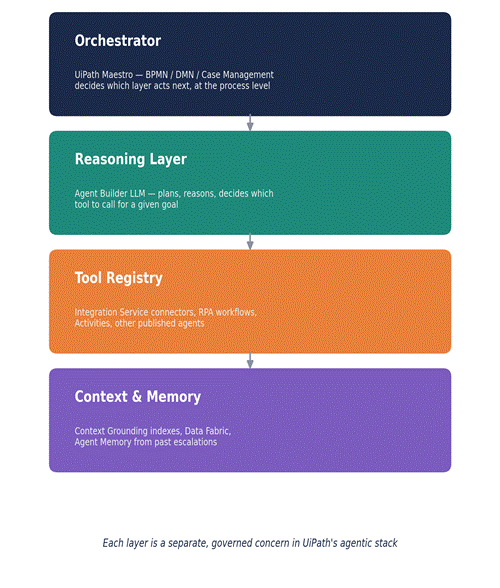
Four governed layers: orchestration, reasoning, tools, and context — each with its own controls.
1. The Reasoning Layer
This is the LLM inside an Agent Builder agent, the component that parses intent, plans a sequence of actions, and decides which tool to invoke next. UiPath hosts these models in its own private cloud rather than routing data to third-party model providers directly, which matters for the data-residency conversations that come up early in almost every enterprise rollout.
2. The Tool Registry
An agent without tools can only talk. The tools available to a UiPath agent include Integration Service connectors (Salesforce, SAP, ServiceNow, Slack, and hundreds of others), existing RPA automations published as callable workflows, individual Activities, and other published agents used as sub-agents. This is also where tool guardrails live, custom rules that constrain exactly how and when a given tool can be called, which is what keeps an agent from, say, issuing a refund outside an approved amount range.
3. The Orchestrator
Maestro is the process-level orchestrator. It models the end-to-end flow using BPMN 2.0 for structured processes, DMN for decision logic, and Case Management for long-running, exception-heavy work like claims or onboarding. Maestro decides which actor, an agent, a robot, or a person, handles each step of the process, and it’s where audit trails, role-based access, and SLAs are enforced at the process level rather than inside individual automations.
4. Context and Memory Layer
Context Grounding indexes give agents access to permissioned company knowledge, policy documents, product catalogs, historical case data, chunked and retrieved in a way that keeps the LLM’s answers relevant and reduces hallucination. Data Fabric provides zero-copy, real-time access to enterprise data without duplicating it into yet another silo. Agent Memory captures the resolution of past human escalations so the agent doesn’t ask the same clarifying question twice.
Step-by-Step: Building the Workflow
Here’s how the claims scenario from the introduction actually gets built, mapped to UiPath’s tooling.

The same six-stage flow, now backed by an agent and a governed process instead of fixed rules.
1. Define the goal and the process shape. In Maestro, model the claim-to-resolution flow as a Case: define stages (intake, validation, decision, payout), SLAs per stage, and escalation rules for cases that stall.
2. Classify inbound intent. Communications Mining reads each inbound email and classifies it, a new claim, a status inquiry, a document resubmission, and passes that classification into the case.
3. Extract structured data. Document Understanding pulls the claim fields from whatever’s attached, using foundation models for unfamiliar layouts and specialized models for high-volume, known form types, with confidence scores attached to each field.
4. Build the reasoning agent. In Agent Builder, define an agent with a clear system prompt, a Context Grounding index over policy documents, and tools scoped to exactly what it needs: a policy lookup connector, a fraud-check API, and a “request more information” email tool. Nothing more.
5. Wire in guardrails and escalation. Configure tool guardrails on any action with financial impact, and define an explicit escalation path so uncertain cases land in Action Center rather than being pushed through.
6. Deploy the agent as a Maestro task. Publish the agent and add it as an agentic task inside the Case, so Maestro can route to it, to a robot, or to a person, depending on the case’s current state and DMN rules.
7. Test against real cases before going live. Run the agent against a held-out set of historical claims and use Agent Score and the Optimizer to check trajectory quality, not just final output, before promoting it to production.
Enterprise Design Principles
- Route any high-risk action, large payouts, policy cancellations, external customer communication, through an Action Center escalation rather than letting an agent execute it unsupervised. – Human-in-the-loop by design:
- Give each agent only the connectors and Activities it actually needs. A claims agent doesn’t need write access to HR systems, and it shouldn’t have it. – Least-privilege tool scoping:
- Log every tool call, model decision, and escalation against the Maestro process instance so you can reconstruct exactly why a case was routed the way it was, this is usually the first thing a compliance review asks for. – Observability end to end:
- If a connector call fails or a document extraction comes back low-confidence, the agent should surface a readable error and either retry, ask a clarifying question, or escalate, not stall the case indefinitely. – Graceful failure, not silent failure:
- Not every step needs the most capable model. Use specialized, fine-tuned models for high-volume classification and extraction, and reserve heavier reasoning for the genuinely ambiguous cases. – Model and cost tiering:
Reminder: any process that reads external, unstructured input (emails, uploaded documents) should sanitize that input before it reaches an agent’s context window. Instructions hidden inside a forwarded email or a PDF are a real prompt-injection risk, and tool guardrails plus least-privilege scoping are your main defense.
10 Common Mistakes and Pitfalls
1. Giving one agent too many tools. An agent juggling twenty connectors will misuse parameters. Split responsibilities across a few narrowly scoped agents instead.
2. Vague tool descriptions. A connector named “UpdateRecord” with no description of when to use it will get called incorrectly. Write the same kind of documentation you’d want a new hire to read.
3. Skipping Context Grounding and hoping the LLM “just knows” your policies. It doesn’t, ungrounded agents answer from general training data, not your actual documents.
4. No escalation path. If there’s no defined route to Action Center, an uncertain agent will either guess or stall. Always define what “I don’t know” should do.
5. Treating the agent like a rigid script. Over-constraining the prompt and tool sequence defeats the point, leave room for the agent to reason within its guardrails.
6. Ignoring confidence scores from Document Understanding. A low-confidence extraction pushed straight into a downstream transaction is how bad data enters your ERP.
7. No recursion or retry limits. An agent stuck reasoning in a loop burns inference cost fast; set hard limits at the agent and process level.
8. Skipping the evaluation set. Publishing an agent without testing it against a held-out set of historical cases means your first real users are your QA team.
9. Over-scoping tool permissions. Connecting an agent to more systems than the use case requires widens your audit surface for no benefit.
10. Starting with a multi-agent swarm on day one. Most first projects need one well-scoped agent and a handful of tools, not five agents negotiating with each other. Expand only once you’ve seen where a single agent actually struggles.
Best Practices Checklist
- Deterministic fallback defined for every agent-handled step, so a repeated failure routes to a human queue instead of looping.
- Every high-impact tool call gated by a guardrail or a human approval step.
- Context Grounding indexes scoped to the specific domain the agent needs, not the entire company knowledge base.
- Confidence thresholds set explicitly for Document Understanding and Communications Mining outputs feeding into DMN decisions.
- Audit trail confirmed at the Maestro process level, not just inside individual automations.
- Agent evaluated with Agent Score and Optimizer against real historical cases before go-live.
- Model tiering reviewed: cheaper, specialized models used wherever the task doesn’t require full reasoning capability.
RPA vs. Agentic AI
| Feature | Traditional RPA | Agentic AI in UiPath |
| Decision making | Rule-based (If X, then Y) | Contextual, LLM-reasoned via Agent Builder |
| Exception handling | Crashes and alerts a human | Escalates to Action Center, attempts self-correction |
| Maintenance | High — breaks on UI or layout changes | Lower — adapts to unstructured input |
| Input data | Structured (CSV, fixed UI, fixed templates) | Unstructured (emails, chat, loose documents) |
| Scalability | Linear — new rules needed for new edge cases | Dynamic — generalizes to unseen edge cases |
| Orchestration | Orchestrator queues and schedules robots | Maestro coordinates agents, robots, and people against a goal |
| Ideal use case | Structured data moves between legacy desktop apps | End-to-end claims, onboarding, or invoice triage |
Future Trends (2026)
- Coded agents in production. UiPath now lets developers package agents written in frameworks like LangGraph and run them through Orchestrator alongside native low-code agents, widening the door for teams with existing Python investments.
- Deeper MCP adoption. The Model Context Protocol is emerging as a standard way for agents to reach external tools and data sources, reducing the custom integration work UiPath’s Integration Service previously had to cover connector by connector.
- Agents as tools for other agents. Published agents can now be composed as tools inside other agents, which is pushing enterprise deployments toward modular, multi-agent structures rather than one monolithic agent per process.
- Maestro as the default runtime for agentic work. As more processes combine agents, robots, and people, Maestro’s Case Management and BPMN modeling are becoming the default place production agentic workflows get deployed, rather than a standalone agent running on its own.
Conclusion
Building your first agentic workflow in UiPath is less about the LLM and more about the engineering discipline wrapped around it: scoped tools, grounded context, explicit escalation paths, and an orchestration layer that keeps the whole thing auditable. Maestro and Agent Builder give you the pieces. What determines whether a deployment survives contact with production is whether you started narrow, tested against real cases, and put humans exactly where their judgment adds the most value.
Start with one process, one well-scoped agent, and a handful of tools. Watch where it struggles. Expand from there.
FAQ
Do I need to know how to code to build a UiPath agent?
No. Agent Builder is a low-code experience in Studio Web, and Autopilot can generate a starting agent definition from a natural-language description. Coded agents (Python, LangGraph) are also supported for teams that want that route, but they’re not required.
Is Agentic AI in UiPath expensive to run?
It depends on model tiering. Routing every classification and extraction through your most capable model will drive up inference cost quickly. Using specialized models for high-volume, well-defined steps and reserving heavier reasoning for genuinely ambiguous cases keeps cost proportional to complexity.
Can agents replace my existing RPA bots?
Not usually, and not entirely. Agents are strongest at reasoning over unstructured input and making judgment calls; RPA robots remain the more efficient choice for deterministic, high-volume, screen-bound work. Most production processes combine both under Maestro.
How do I stop an agent from taking a harmful or costly action?
Tool guardrails, least-privilege tool scoping, and explicit human-in-the-loop escalation for high-risk actions. Any action with real financial or customer impact should route through Action Center for approval rather than executing unsupervised.
Where does data privacy fit in?
UiPath hosts the models used by Agent Builder agents in its own private cloud rather than routing data to third-party providers directly, and Context Grounding retrieval is permissioned so agents only see governed, authorized data.
Key Takeaways
- Agentic workflows are goal-directed, not linear: an agent reasons, calls tools, and adapts until the process reaches its outcome.
- UiPath’s stack splits cleanly into four layers, orchestration (Maestro), reasoning (Agent Builder), tools (Integration Service, RPA, other agents), and context (Context Grounding, Data Fabric).
- Engineering discipline decides success: scoped tools, defined escalation paths, confidence thresholds, and audit trails matter more than which model you pick.
- Start narrow. One agent, a few tools, one process. Expand only once you’ve seen where it actually struggles.